
How to Create Digital Products With Claude AI, Start to Finish
Sep 20, 2026
Most guides on this topic start by telling you to open the AI. That is the wrong first move, and it is why so many people build products nobody buys.
I have watched a lot of creators build a digital product the same way. They get an idea in the shower, open an AI chat window that afternoon, and have a forty-page workbook by the weekend. Then they list it, and it sells four copies in six months.
The product was fine. The idea was never checked.
Claude is the fastest way I have found to go from a validated idea to a finished product. It is also the fastest way to build something elaborate that nobody was looking for, because it removes the friction that used to force you to think first.
So this walkthrough puts the research before the writing, which is the order I actually work in.
What Claude Does and Does Not Do Here
Claude is doing three jobs in this process: reading your research back to you and finding the pattern, arguing against your idea before you commit, and building the structure of the thing once you have decided.
It is not writing your product. Your buyers can tell, and more to the point, so can you. If you have not used Claude before, my beginner's guide to Claude AI covers setup and prompting before you start here.
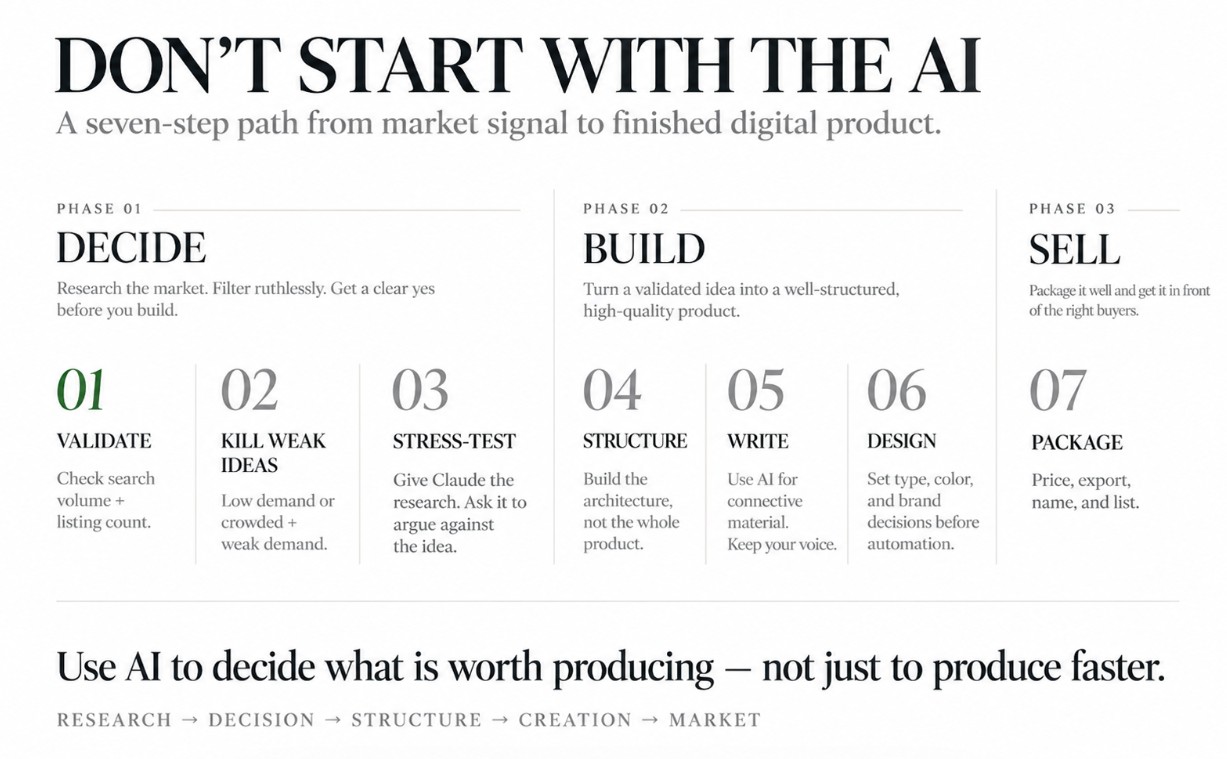
The rest of this is the seven steps I run.
Step 1: Validate the Idea Before You Open Claude
I use two tools for this, and they tell you different things.
Ubersuggest gives you broad search volume. It tells you how many people are looking for something each month, and roughly how hard the term is to rank for. It also suggests related phrases, which is often where the real opportunity sits.
Etsy's Marketplace Research tool gives you something Ubersuggest cannot: the listing-to-search ratio. You see how many people are searching a term and how many listings already exist for it. That second number is the one most people skip.
Search volume alone tells you there is demand. The ratio tells you whether that demand is already being met by four hundred other sellers.
Both tools suggest similar terms and phrases as you go, so treat the first search as a starting point rather than an answer. I usually come out with a list of eight or ten phrasings I had not considered, and more than once the version I ended up building for was a phrase the tool suggested rather than the one I typed in.
What I am actually looking at
In Ubersuggest, monthly volume and difficulty, then the related terms panel. Difficulty matters less than people think for a product listing, since you are not trying to outrank a publisher. It matters a lot if you plan to write a blog post supporting the product later.
In Etsy's Marketplace Research, the search count against the listing count, and then the listings themselves. I open the top ten and look at what they actually deliver. Sometimes a category looks saturated until you open the products and realize most of them are thin.
There are other apps that are great for digital product keyword search such as Everbee and E-rank. Regardless of the keyword tool you use, you can upload the data in Claude to help you interpret.
What I am looking for
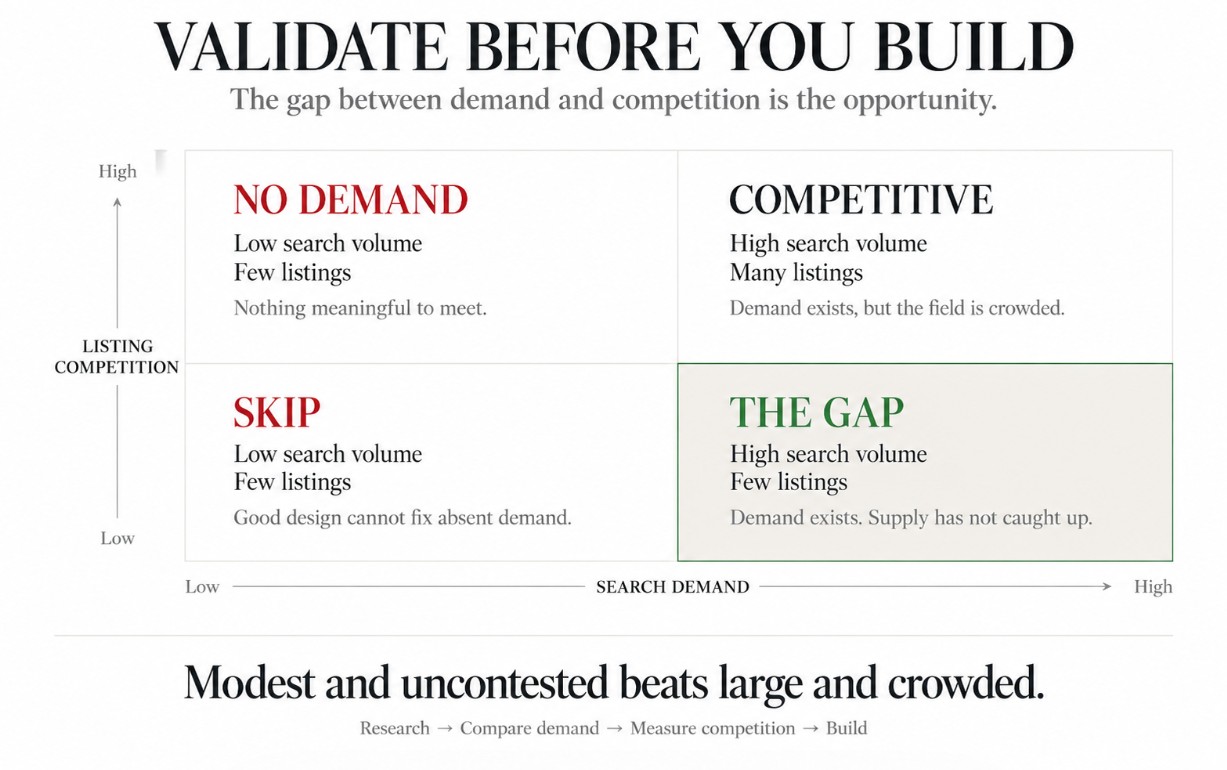
Steady search volume with a listing count that has not caught up yet. That gap is the whole game. A term with decent monthly searches and a thin field of existing products is worth building for, even if the volume is modest.
Modest and uncontested beats large and crowded almost every time, because you can own the first one.
Write the numbers down. You are going to hand them to Claude in step three.
Step 2: The Two Signals That Kill an Idea
Two things make me walk away, and both are the inverse of what I just described.
Low search volume. If almost nobody is searching for it, no amount of good design fixes that. You are not creating demand with a listing, you are meeting it.
High listing count with low search volume. This is the worse of the two, and it is the one that fools people. A category can look busy and successful from the outside. Hundreds of listings feels like proof that the market is hot. What it often means is that hundreds of sellers all had the same idea, the searches never materialized, and now everyone is splitting a thin stream of traffic.
A crowded category with real search volume is competitive. A crowded category with weak search volume is a trap.
I kill ideas at this stage regularly, and it costs me nothing. Killing one after forty hours of building is the expensive version.
An example of this is when I was researching digital products I could create for fitness trainers. My research uncovered that 'fitness trainers' had very low search volume but uncovered that 'personal trainer' was a better search term to use.
Later that became my collection of Personal Trainer templates that I created and I avoided spending countless hours on a search term that nobody was using.
Step 3: Hand the Research to Claude and Let It Argue With You
Now the AI enters.
Paste your research in. The keyword list, the volumes, the listing counts, your notes on what the existing products look like. Then ask Claude to make the case against building it.
The prompt I use looks roughly like this:
"Here is my keyword research for a product idea. Act as a skeptical digital product buyer who has already bought three things like this and been disappointed. Tell me why this product would not be worth my money, and what would have to be true for it to be worth it. Before you respond, ask me one question at a time until you have enough context to do this well."
That last line matters more than the rest. It stops Claude from guessing at the gaps and makes it interview you instead, which usually surfaces the thing you were avoiding thinking about.
What comes back is not always right. It is reliably useful. Twice now it has pushed me to narrow a product from something broad into something specific, and the specific version sold better.
Step 4: Build the Structure, Not the Whole Thing
Once you have committed, Claude's best work is skeletal.
Ask it for the section map. The module breakdown. The order things should appear in and what each part has to accomplish before the reader moves on. Ask it where a buyer would lose interest.
For a workbook, that is the exercise sequence. For a template kit, it is which templates belong in the set and which are filler. For a guide, it is the chapter logic.
Give it the research from step one when you ask. A structure built against real search terms comes back organized around what buyers were looking for, rather than around how you happen to think about the topic. Those are rarely the same shape.
One prompt that consistently earns its place: ask Claude which section a buyer would skip, and which one they bought the product for. The answers are often not the sections you would have guessed, and it tells you where to spend your writing time.
You are looking for the architecture. Fill it in yourself.
Step 5: Write It in Your Voice
This is the part I do not hand over, and I would tell you the same even if it were slower.
Feed Claude three or four samples of your own writing before you ask it for anything close to final copy. Emails you have sent, posts that worked, a page from something you have already published. Then ask it to match that, and expect to rewrite a good portion anyway.
The parts worth writing entirely yourself: the introduction, anything where you are telling a story, and every instruction where getting it wrong would cost the reader something.
Claude is good at first drafts of connective material. Transitions, summaries, the paragraph that sets up an exercise. Let it do that and keep the rest.
Step 6: Design It in Canva
Claude connects directly to Canva, which removes the copy-and-paste step that used to sit between the writing and the design.
You can hand it the finished structure and have it lay out pages against a template you already use. What you should not do is let it make the aesthetic decisions. Set your brand kit first, pick your type and color, then let the automation fill the layout.
The order matters. Design decisions made by default are the reason so many digital products look like digital products. A buyer cannot articulate why one workbook feels worth thirty dollars and another feels worth four, but she knows within about two seconds of opening it, and most of that judgment is type, spacing, and whether the thing looks like it was made on purpose.
Build the cover last. It is the only page most buyers see before they decide, and it is easier to design once you know what is actually inside.
If you are starting from scratch on the design side, my Canva templates for coaches are built for this, and they are the fastest way I know to get a product looking finished rather than homemade.
Step 7: Price, Package, and Get It Listed
Pricing is the step people agonize over and it rarely deserves it. Look at what the products you found in step one are charging, then decide whether yours sits below, at, or above that, and be able to say why in one sentence.
If you cannot finish that sentence, you are guessing, and guessing low is the more common mistake. Underpricing a digital product does not make it sell more. It signals that you are not sure it is good, and buyers read that signal accurately.
Packaging is quicker than it sounds. Export a PDF, and if the product is something people will fill in, export an editable version too. Name the files the way a buyer would want to find them on her desktop six months from now, not the way they came out of Canva.
Where you list it depends on what you are selling and who is buying. I broke down the tradeoffs in Kajabi vs Etsy vs Gumroad, and the short version is that Etsy brings you traffic while Kajabi lets you own the customer.
If you are selling from your own site, the sales page build for a digital product is its own walkthrough.
What This Looks Like End to End
Most digital products that I create used to take a couple of weeks but with Claude doing a lot of the heavy lifting I can get one done in about a week.
Keep in mind, I am still doing a lot of work by hand to make sure my digital products come out as a polished offer. I want to make sure that they feel personal and have an aesthetic look to them, something that I don't turn over to Claude.
If you are creating digital products or courses often with Claude and use a consistent and repetitive workflow, create a project to save time from explaining yourself over and over each time. I cover this in my Claude Strategic Playbook.
The Part That Actually Separates People
Most of what I just described is a process, and processes are learnable. You could run these seven steps this week.
What takes longer is the shift in where you point the tool.
Plenty of people use Claude to produce things faster. Fewer use it to decide what is worth producing at all, which is what steps one through three are really doing. The research is not the boring part you get through on the way to the fun part. It is the part that determines whether the fun part was worth doing.
That distinction, using AI to think rather than just to make, runs through everything I write about this.
Where to Go From Here

If you need the ideas rather than the process, I put fifty digital product ideas built with Claude connectors together separately, all of them things my wife and I have actually made and sold. Start there, then come back and run the validation.
And if you want the full system rather than one workflow, that is what The Claude Playbook is. It is 133 pages on turning Claude into the operating layer of your business, with a chapter on digital products that goes deeper on everything above.
Go pick an idea and run step one on it.
Simon.
Keep Learning -
- Previous Article: How To Use Claude AI: A Beginners Guide
- Next Article: How To Connect Claude AI to Kajabi
Grab my free High Ticket Coach Branding Guide
A free guide for coaches, consultants, and creators who are ready to ditch the DIY look and step into a cohesive, premium brand presence that sells.
We hate SPAM. We will never sell your information, for any reason.