Kajabi SEO Settings: What You Actually Need to Use
Jul 03, 2026
Kajabi gives you a solid set of SEO tools built right into the platform. The problem is they're scattered across different sections, easy to overlook, and most coaches either ignore them entirely or fill them in so quickly they may as well not have bothered.
This post is a walkthrough of exactly which settings matter, where to find them, and what to write in each field. No theory, no padding. Just the settings that actually affect whether your site gets found.
Kajabi Gives You the Settings. Most Coaches Never Touch Them.
Every page on your Kajabi site has its own set of SEO fields. That includes your website pages, your blog posts, and your landing pages. Each one can have a custom title tag, a custom meta description, and a custom URL slug.
Most coaches leave these on default, which means Kajabi auto-populates them from whatever headline or page name you used when you built the page. That default is almost never optimized for search. It's just convenient.
Fixing this is straightforward once you know where to look and what to write in each field.
Where to Find Your SEO Settings in Kajabi
The location depends on the type of page you're working with, and this trips a lot of coaches up because it's not consistent across the platform.
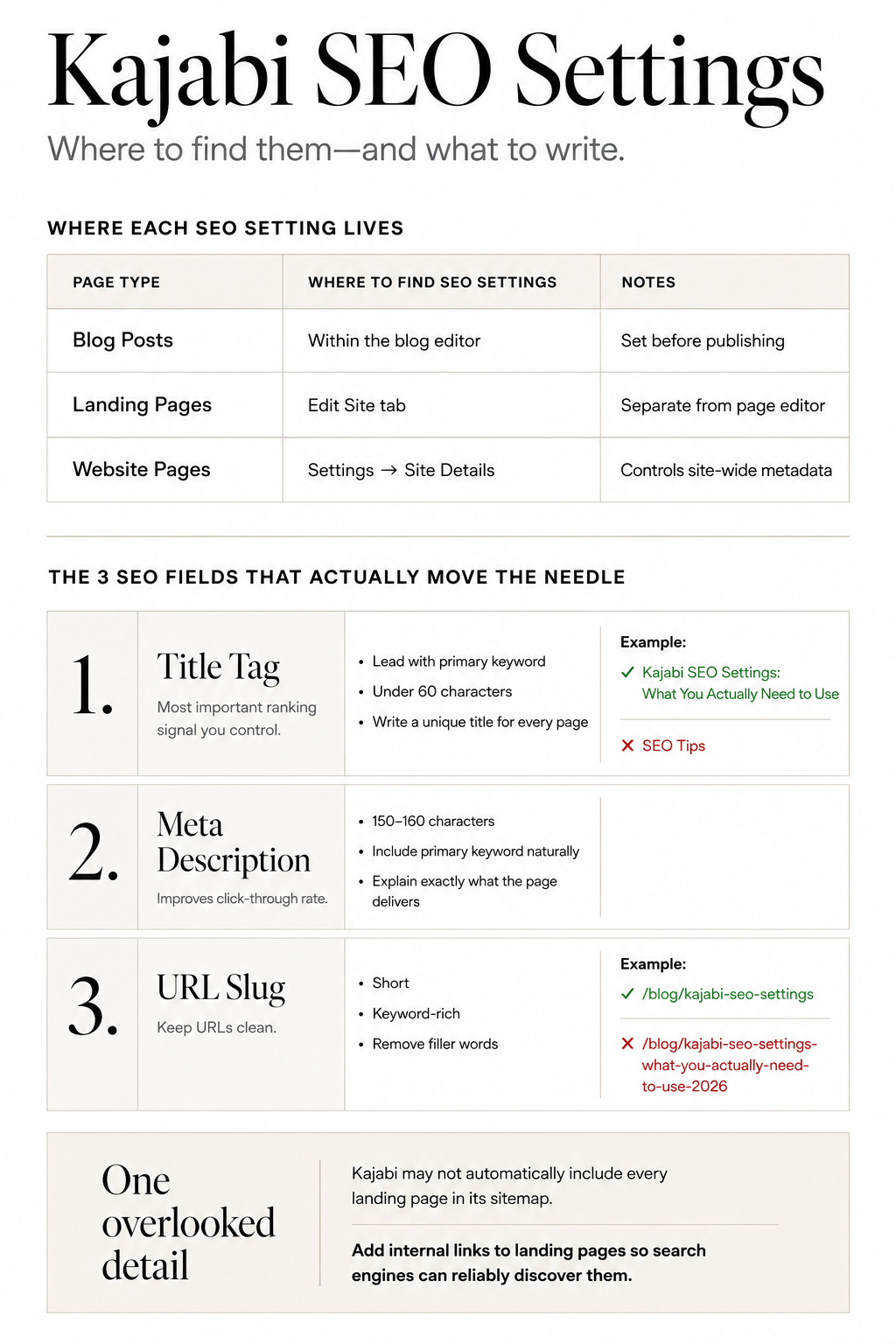
Blog posts: Your SEO title and meta description are on the same page where you write and edit the post itself. Scroll down or look for the SEO fields alongside your post content. Set these before you hit publish.
Landing pages: Go to the Edit Site tab for the landing page. The SEO fields are managed from there, separate from the page content editor.
Website pages: Your site-wide SEO settings live in Settings, then Site Details. This is where your overall site title and meta information is managed.
One thing worth knowing: Kajabi's auto-generated sitemap covers your main website pages, but custom landing pages aren't always included automatically. That means internal links pointing to your landing pages are often the only reliable way Google finds them. Don't assume a page is being indexed just because it's live.
The Settings That Actually Move the Needle
These are the fields that directly affect how Google reads and ranks your pages.
Title tag
This is the single most important on-page SEO element you control. It's the clickable headline that appears in Google search results, and it tells Google what the page is about.
Write a custom title tag for every page. Lead with your primary keyword, keep it under 60 characters, and make it specific. "Kajabi SEO Settings: What You Actually Need to Use" is better than "SEO Tips" or leaving it on whatever Kajabi defaulted to.
Meta description
The meta description is the short paragraph of text that appears under the title in search results. It doesn't directly affect your ranking, but it does affect whether someone clicks through to your site.
Write something that tells the reader exactly what they'll get and gives them a reason to click. Include your primary keyword naturally. Keep it between 150 and 160 characters. Think of it as a one-line pitch for the page.
URL slug
Kajabi lets you customize the URL for every page and post. Use it.
A clean, keyword-rich slug is better than whatever Kajabi auto-generates. For blog posts, the format is yoursite.com/blog/your-post-slug. Keep the slug short, include your primary keyword, and strip out filler words like "the" and "a" unless they're part of the keyword phrase.
"/blog/kajabi-seo-settings" is better than "/blog/kajabi-seo-settings-what-you-actually-need-to-use-2026."
Set this before you publish. Changing a URL after a post is live can break any links pointing to it, so get it right the first time.
Your Blog Posts Need Their Own SEO Settings Too
This catches a lot of coaches off guard. The headline you write at the top of your blog post is not the same as your SEO title. They're separate fields, and they can say different things.
Your post headline is what readers see when they land on the page. It can be conversational, punchy, and written for humans.
Your SEO title is what Google shows in search results. It should be keyword-forward, clear, and within the character limit.
The same applies to your meta description. What you write in your blog post intro is not what appears in search results unless you've left the meta description field blank, in which case Google pulls a snippet from your content and it may not be what you'd choose.
Fill in both fields for every post you publish. It takes three minutes and it's one of the most consistently skipped steps in Kajabi content publishing.
The Settings You Can Stop Worrying About
A few things come up constantly in Kajabi SEO conversations that are worth less of your attention than coaches think.
Robots.txt: Kajabi manages this at the platform level. Unless you're a developer with a specific reason to change it, leave it alone.
Schema markup: Kajabi adds basic structured data automatically. You can't manually edit schema on standard Kajabi pages without custom code, so don't spend time on what you can't control here.
Social sharing settings: Kajabi lets you set a separate image, title, and description for when your page is shared on social media. These don't affect your search rankings. Set them if you want your social previews to look polished, but don't treat them as an SEO task.
A Quick Checklist Before You Hit Publish
Run through this for every page and post before it goes live.
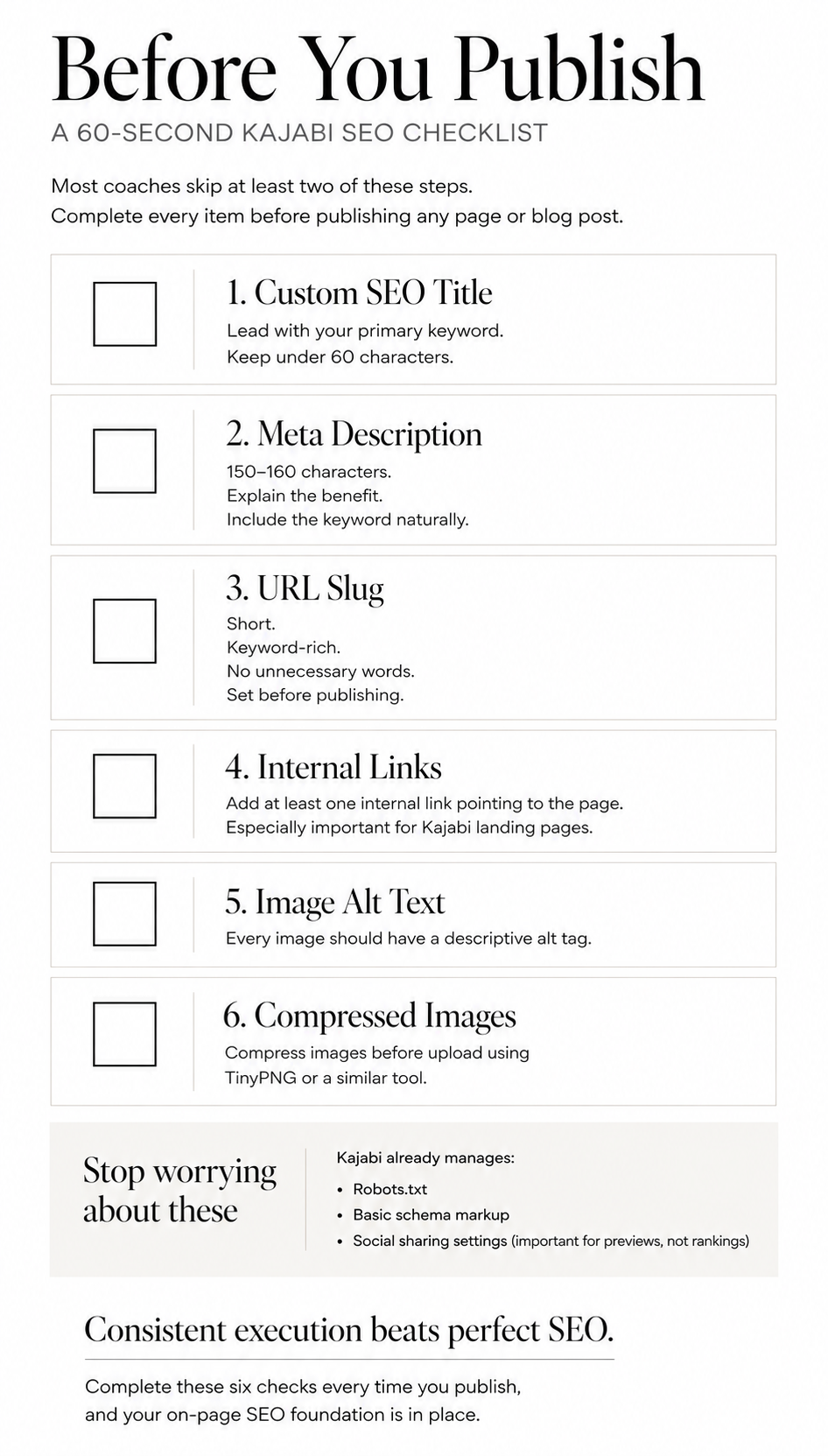
Custom SEO title written (under 60 characters, keyword-forward): yes or no.
Custom meta description written (150 to 160 characters, includes primary keyword): yes or no.
URL slug set manually (short, keyword-rich, no filler words): yes or no.
At least one internal link pointing to this page from somewhere else on your site: yes or no.
All images have descriptive alt tags: yes or no.
Images compressed before upload (use TinyPNG or similar): yes or no.
If you can check all six before every publish, your on-page SEO foundation is solid. Most coaches skip at least two of these every time, which is exactly why their content doesn't perform as well as it should.
Final Thoughts
The Kajabi SEO settings themselves are simple. What makes them effective is using them consistently and intentionally on every single page, not just the ones you built carefully and not just on launch day.

If you want a complete system for this, including a keyword mapping process, a full site hierarchy framework, and a 30-day implementation roadmap, that's what the Kajabi SEO Playbook covers. It's the step-by-step guide I built from restructuring my own Kajabi site, and it's designed for coaches who want clear instructions rather than a list of things to Google separately.
Get the Kajabi SEO Playbook → https://www.simonwparsons.com/kajabi-seo-guide
Simon
Previous Article: The Kajabi Blog Strategy That Actually Builds Authority
Grab my free High Ticket Coach Branding Guide
A free guide for coaches, consultants, and creators who are ready to ditch the DIY look and step into a cohesive, premium brand presence that sells.
We hate SPAM. We will never sell your information, for any reason.