Run Market Research Using Claude in Chrome + Artifacts + Projects
Four research jobs that used to eat an afternoon each, handed to Claude with a brief that lets it run while you work on something else.
Lessons 6Copy-ready briefs 5Tools Claude in Chrome
00
Introduction
What We Are Doing Here
What This Module Covers
Market research is the work every coach and product seller knows they should do and almost nobody does properly. Opening twenty Etsy listings one at a time, copying titles into a spreadsheet, clicking through a competitor's funnel to find the price, reading three hundred reviews to find the five sentences that matter. It takes a whole afternoon, so it gets skipped, and offers get built on guesses.
Keep in mindI am using examples here like Kajabi or Etsy which may not apply to you, but it's the workflow that is the lesson, not my specific apps/platforms. Adapt as needed for what you use.
Claude in Chrome does that afternoon for you. It opens the pages, reads them, records what you asked for, and hands back a report that is organized, sourced and ready to act on.
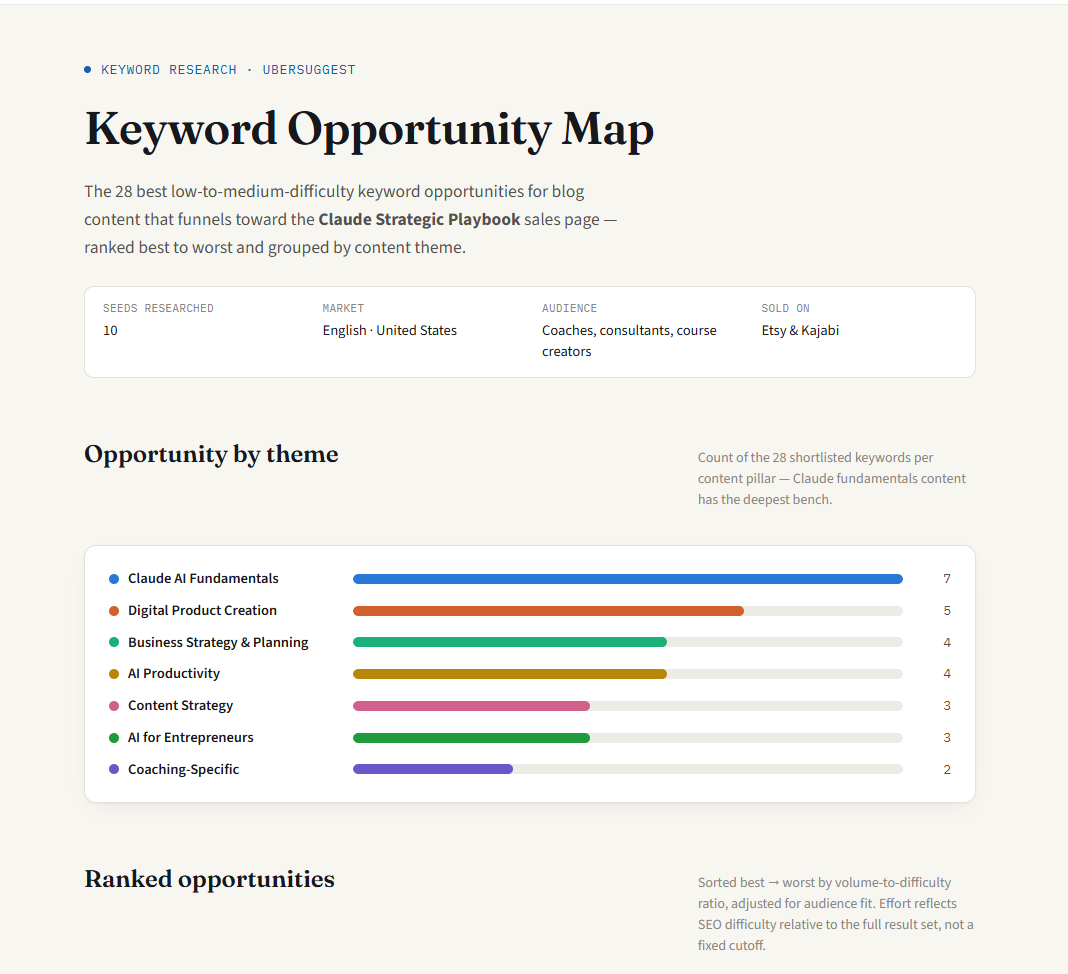
The part that changed how I work is simple. Once the prompt is sent, I leave. During my keyword research run, Claude worked through Ubersuggest across more than a hundred browser actions while I worked on something else entirely. I came back to a ranked map of 28 keywords grouped into content themes, and I hadn't looked at the browser once while it ran.
This module walks through four research jobs I ran for real, in the order a product business actually needs them. You'll scan a marketplace to see what sells, tear down competitors to see how they sell, collect buyer language to learn how to talk about it, and run keyword research to decide what to write so buyers find you.
Every lesson uses the same research brief, which Lesson 4.1 teaches. Once you have the brief, each new research job is mostly a matter of changing the sources and the questions.
The System at a Glance
Write a research brief that lets Claude work without you watching
Scan a marketplace search page to find the patterns behind the listings that sell
Tear down competitors' offers, funnels and pricing
Collect the exact words buyers use about their problems, doubts and wins
Turn keyword research into a content plan and a finished article brief
Stage 1 is the skill underneath everything else. Stages 2 through 4 answer what to sell, how to position it and how to describe it. Stage 5 decides how buyers find it, and it shows the full path from one research run to a published article.
01
Lesson 4.1
Write a Research Brief Claude Can Run Alone
Chapter 8 of the Claude Strategic Playbook (you can access it in the Member Portal) covers what Claude in Chrome is, how to install it and how to give it a task. This lesson skips all of that and goes straight to the part that decides whether a research run comes back useful: the brief.
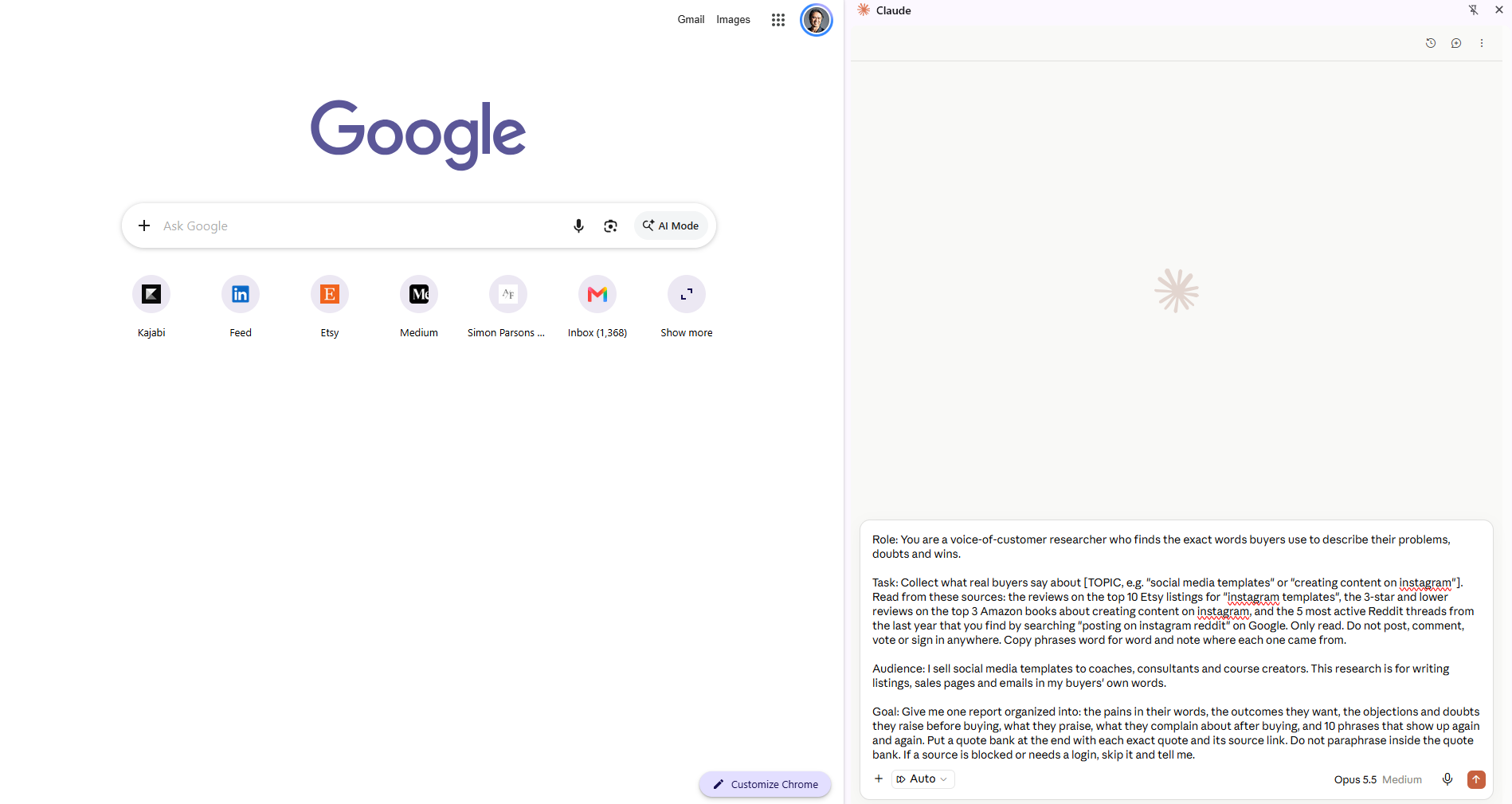
A research brief is a prompt written for a job you won't supervise. When you're watching, a vague instruction costs you one correction. When you've walked away for forty minutes, a vague instruction costs you the whole run. So the brief has to answer every question Claude would otherwise stop and ask.
I use the Role, Task, Audience, Goal structure from Chapter 5 of the Playbook for every research job, with the task section doing most of the work. A good research task names four things: where to start, how many items to cover, exactly which details to record for each one, and what to analyze once the collecting is done.
Three guardrail lines go into every brief. They look small and they carry most of the reliability.
The first is "If a detail isn't visible, mark it 'not shown' instead of guessing." Without it, a missing price becomes an estimated price, and you can't tell which is which in the report.
The second is a stop rule: "If a site blocks you or shows a verification check, skip it and tell me." That line saved my buyer language run. Reddit refused to load, and instead of stalling or making something up, Claude skipped it, listed the threads it had found, and kept going with the other sources.
The third is a read-only rule whenever forms or accounts are involved: "Do not enter an email address, submit any form, post, comment or sign in." Research should never leave a trace on someone else's site.
Research brief template
Role: You are a [type of expert] who [what that expert is good at].

Task: Start at [page, search term or list of URLs]. Work through [how many items], skipping [what to skip, e.g. ads]. For each one, record: [every detail you want, listed]. Then analyze the full set for: [the patterns, comparisons or gaps you care about].

Read only. Do not enter an email address, submit any form, post, comment or sign in anywhere.

Audience: I sell [what you sell] to [who buys it]. This research is for [the decision it feeds].

Goal: Give me one report with [the sections you want, in order]. If a detail isn't visible, mark it "not shown" instead of guessing. If a site blocks you or shows a verification check, skip it and tell me.
A few habits make the runs go better.
Fill every placeholder before you send. In one of my runs I left a bracketed example sitting in the prompt. Claude worked around it, but you shouldn't count on that.
Watch what you're logged into. Some sites change what they show you when you're signed in. Lesson 4.2 shows how much that can skew a marketplace scan.
Save the report before you close anything. The first Etsy teardown I ever ran is gone because I closed the side panel and never saved the result. Now every report gets exported to PDF the moment it's done.
Check the approval setting. When auto-approve is on, Claude moves from page to page without stopping to ask, which is what lets you walk away. It still pauses if something looks unsafe, and the Stop Claude button sits at the bottom of the page if you want to step in.
A brief loaded in the Claude in Chrome side panel
Try it yourself
Pick one research question you've been putting off. Write a brief for it using the template, including all three guardrail lines, and save it somewhere you can reuse it.
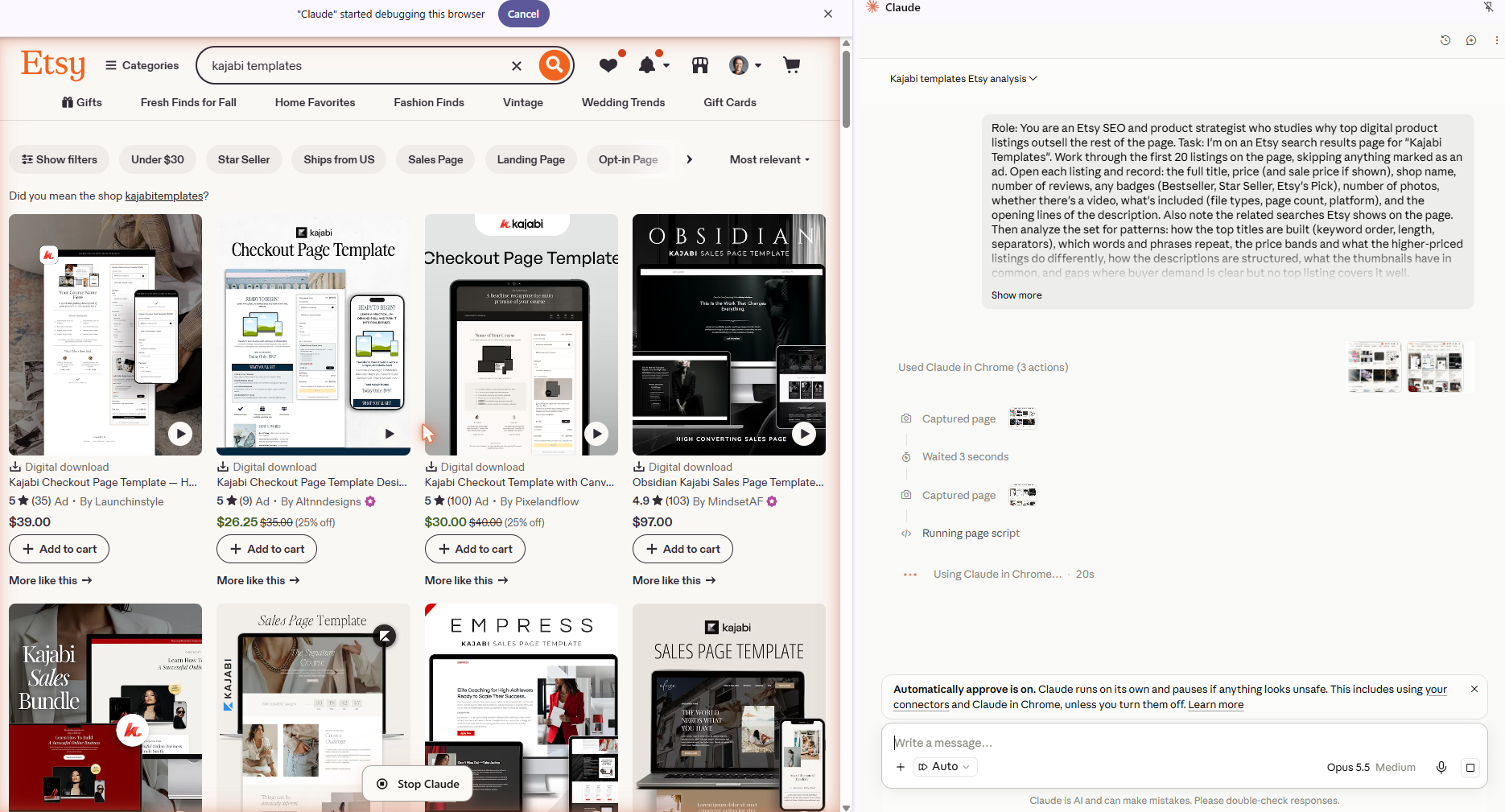
Before you write a listing or price a new product, you want to know what the listings at the top of the search are doing. That means opening each one, reading the title, checking the price, counting the photos and skimming the description. Twenty listings is a couple of hours of clicking. Claude does it from a single search results page.
This works on the regular, customer-facing Etsy search, the same page a buyer sees. Etsy's own seller tools and paid research apps can add data, but you don't need them for this. The patterns are sitting on the page.
I ran this for my own niche with the search term "kajabi templates."
Open Etsy and search your term the way a buyer would.
Open the Claude in Chrome side panel and paste the brief below.
Send it, then go do something else.
When the report comes back, export it before you close the panel.
Etsy teardown brief
Role: You are an Etsy SEO and product strategist who studies why top digital product listings outsell the rest of the page.

Task: I'm on an Etsy search results page for "[SEARCH TERM]". Work through the first 20 listings on the page, skipping anything marked as an ad. Open each listing and record: the full title, price (and sale price if shown), shop name, number of reviews, any badges (Bestseller, Star Seller, Etsy's Pick), number of photos, whether there's a video, what's included (file types, page count, platform), and the opening lines of the description. Also note the related searches Etsy shows on the page.

Then analyze the set for patterns: how the top titles are built (keyword order, length, separators), which words and phrases repeat, the price bands and what the higher-priced listings do differently, how the descriptions are structured, what the thumbnails have in common, and gaps where buyer demand is clear but no top listing covers it well.

Audience: I sell digital templates to coaches, consultants and course creators on Etsy. This research is for writing new listings and improving existing ones in this niche.

Goal: Give me one report with a summary table of all 20 listings, the patterns you found, 5 title formulas I can reuse, a description outline, a pricing recommendation, and the 3 strongest gaps. If a detail isn't visible, mark it "not shown" instead of guessing. If Etsy shows a verification check or blocks you, stop and tell me.
Claude working the Etsy search results
The report came back eleven pages long. It had a table of all twenty listings, a count of which words repeat across titles, four price bands with what separates them, the seven-part order that almost every description follows, what the thumbnails share, five title formulas with made-up examples, a full description outline and a pricing table by product type.
The findings I'd never have spotted by scrolling were the useful ones. The keyword sits in the first three words of 17 of the 20 titles. Named collections only show up on listings priced $45 and up. Every listing under $30 was on a 25 to 60 percent "sale." Then it named three gaps, including a premium standalone opt-in page, which Etsy offers as a filter chip even though only one listing is actually built around it.
What broke. Half of the top twenty were my own listings. Etsy personalizes results for logged-in shoppers, and I visit my own shop constantly. Claude caught it, flagged it at the top of the report, and pointed out that a second load a few minutes later showed a different order and different ads.
That's the lesson inside the lesson. Run marketplace scans logged out or in a private window, and if you're scanning a niche you sell in, add a line to the brief telling Claude to separate your listings from competitors'.
Claude also reported that Etsy showed no related searches block at all, so it used the filter chips under the search bar as the closest signal. Four of the twenty results turned out to be Canva products that Etsy matched loosely, and it called those out too.
Try it yourself
Search one term your buyers use, logged out, and run the brief. Take the five title formulas it gives you and rewrite the title of one of your own listings.
Reverse-Engineer Your Competitors' Offers and Funnels
A marketplace scan tells you what's on the shelf. A competitor teardown tells you how the businesses behind it actually make money: what they give away, what they charge, how a visitor gets from the homepage to the checkout, and what they promise on the way.
Doing this by hand means clicking through three websites, finding pricing pages that are often buried, and taking notes on sales pages you'd rather not read end to end. The run I did for this lesson covered three competitors who sell Kajabi templates and design services, the same space I sell in. In this lesson they're Competitor A, B and C, and you'll see why in a moment.
The brief starts from their URLs, so you can launch it from any page.
Competitor teardown brief
Role: You are a direct-response marketing strategist who reverse-engineers how successful online businesses sell, specifically [your niche] sellers.

Task: Visit the websites of these competitors: [COMPETITOR 1 URL], [COMPETITOR 2 URL], [COMPETITOR 3 URL]. For each one, map their offer ladder (free lead magnet, low-ticket product, core offer, high-ticket offer), with names and prices where shown. Opt-in pages are fine to view, but do not enter any email address or submit any form. Follow the path from their homepage to their main sales page and record each step. On the main sales page, note the headline, the promise, who it's for, what's included, bonuses, guarantee, payment plans, urgency tactics, and the types of proof they use. Also note their platform if visible (Kajabi, Teachable, Stan, etc.).

Audience: I sell [what you sell] to [who buys it]. This research is for positioning and pricing my own offers.

Goal: Give me one report with a side-by-side comparison table, a funnel map for each competitor, pricing patterns across all three, what their sales pages have in common, and the 3 biggest openings where my offers could stand apart. If a price or detail isn't shown, mark it "not shown" instead of guessing.
I narrowed the role line to my niche, which helps Claude know what counts as a "core offer" in that space. The run went clean from start to finish.
The nine-page report opened with a finding I didn't expect. None of the three runs the classic ladder from lead magnet to low-ticket to course to high-ticket. Each one sells the same core relief, "done for you" help with Kajabi, at a different level of involvement: one sells a software tool, one sells DIY templates underneath a custom build service, and one sells a monthly done-for-you subscription.
For each competitor it drew a funnel map, wrote out the exact path it clicked, and broke down the main sales page line by line. Then it found patterns across all three. Refunds are almost never offered. Payment plans are rare at the product level. Proof is about ease and support rather than measured results. Every scarcity claim is based on capacity or a coming price rise, with no countdown timers anywhere.
The three openings it named are what I'm acting on. Nobody sells the sales strategy that goes with the page, and one competitor states outright that anyone who needs copywriting is not a good fit. Consultants who sell through calls are underserved by pages built for course launches. And a clear guarantee plus proof tied to results would stand out in a space where nobody offers either.
A teardown is going to find weaknesses, including prices that don't match from one page to the next and guarantees that aren't really guarantees. That's exactly what makes it useful for your positioning.
The read-only line matters here more than anywhere else. One competitor's free template opt-in sat directly in the path, and Claude viewed the page without entering an email. The report says so in its method note.
Try it yourself
List the three competitors your buyers most often compare you to, run the brief, and write one sentence for each of the three openings describing how your offer would fill it.
The first two lessons tell you what to sell and where to position it. This one tells you how to describe it, using the words your buyers already use.
Reviews, low-star book reviews and community threads are full of those words. Buyers write things like "saves me the stress of designing from scratch" and "I could never design this good," and a line like that does more on a sales page than anything a seller would think to write. Collecting real phrases by hand means reading hundreds of reviews to find the few dozen worth keeping, which is exactly the kind of reading Claude doesn't get tired of.
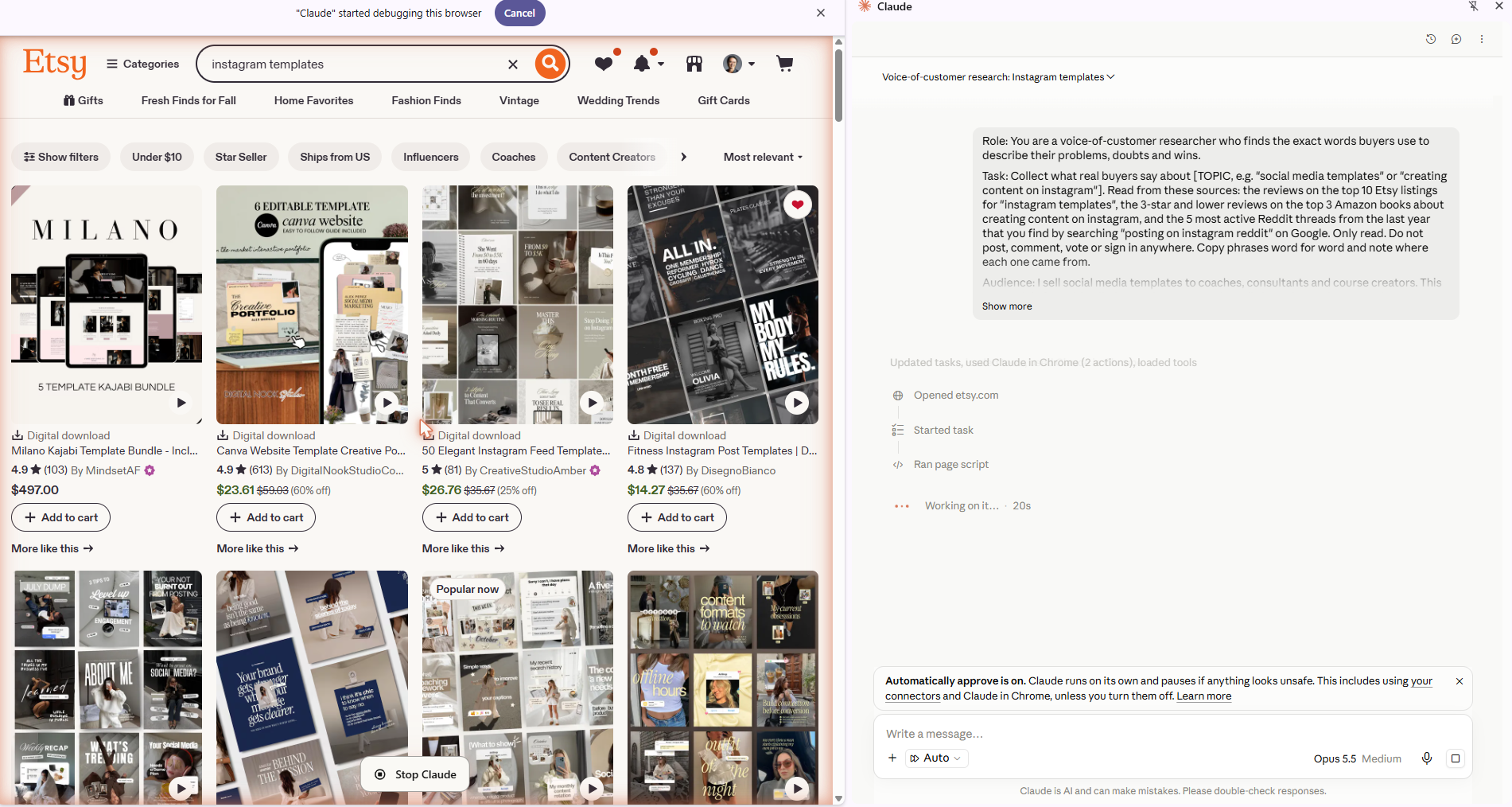
I ran this on Instagram templates, pulling from three sources: reviews on the top ten Etsy listings, the three-star-and-lower reviews on the top three Amazon books about creating Instagram content, and the most active Reddit threads found through Google.
Buyer language brief
Role: You are a voice-of-customer researcher who finds the exact words buyers use to describe their problems, doubts and wins.

Task: Collect what real buyers say about [TOPIC]. Read from these sources: the reviews on the top 10 Etsy listings for "[ETSY SEARCH TERM]", the 3-star and lower reviews on the top 3 Amazon books about [TOPIC], and the 5 most active Reddit threads from the last year that you find by searching "[TOPIC] reddit" on Google. Only read. Do not post, comment, vote or sign in anywhere. Copy phrases word for word and note where each one came from.

Audience: I sell [what you sell] to [who buys it]. This research is for writing listings, sales pages and emails in my buyers' own words.

Goal: Give me one report organized into: the pains in their words, the outcomes they want, the objections and doubts they raise before buying, what they praise, what they complain about after buying, and 10 phrases that show up again and again. Put a quote bank at the end with each exact quote and its source link. Do not paraphrase inside the quote bank. If a source is blocked or needs a login, skip it and tell me.
The low-star reviews are there on purpose, because they show you which objections your page has to answer before someone will buy.
Collecting buyer language from Etsy reviews
The run adapted in three places, and each adaptation is worth knowing about.
Most of the top Etsy listings were new, with zero to two reviews each. Rather than return a thin report, Claude read each shop's review pages and kept only the reviews about social media products. That came to roughly 760 reviews.
Two of the three Amazon books had no usable low-star reviews, so Claude moved to the next organic result and said so in the report.
Reddit wouldn't load at all. Claude listed the five threads it found on Google and quoted none of them, because the search snippets weren't the full thread. That's the stop rule from Lesson 4.1 working exactly as intended.
The thirteen-page report grouped the language into pains, outcomes, objections, praise and complaints, each with exact quotes. The complaints were the most useful part. The top one was sameness: "A third of these templates are practically the same." Then AI-looking designs, sellers who go silent, and one that stings: "I discovered the same templates are available in the Canva library!"
It counted phrases across all 763 reviews. "Beautiful" led, but "easy to use," "exactly what I needed" and "my brand" told me more about what buyers value. It also turned the objections into a short list of what to answer on a sales page: show the full set, state that the designs are original, say whether bundles overlap, and show the editing steps for buyers who aren't technical.
Then came the quote bank, word for word with typos included, and every quote linked to its source.
Try it yourself
Run the brief on the product you sell most. Pick three phrases from the quote bank and use them, unchanged, in your next listing, sales page or email.
To be clearDo not use other people's reviews as your reviews, just the language in your listing description or sales page.
Keyword tools are some of the most tedious software a business owner will ever use. You type a seed term, open the ideas tab, scroll, check the difficulty on each one, open the related tab, and do it all again for the next seed. Claude in Chrome can run the tool for you, as long as you're logged in.
This is the run where I walked away. I logged into Ubersuggest, sent the brief, and worked on other things while Claude went through ten seed terms. It took about 108 browser actions.
This is the exact brief, written for the Claude Strategic Playbook. Swap in your product, audience and seed terms.
Keyword research brief
Role: You are an SEO expert with the depth of knowledge of Neil Patel. You understand search intent, keyword difficulty, content gaps, and how to prioritize keywords by the ratio of opportunity to effort, not just raw volume.

Task: I need you to do keyword research on Ubersuggest (I'm already logged in) for a digital product called [PRODUCT], [one-line description of what it is and who it's for].

Start by researching these seed terms on Ubersuggest, one at a time, and record the search volume, SEO difficulty, and paid difficulty for each: [list of 8 to 10 seed terms].

For each seed term, open the "Keyword Ideas" and "Related" tabs and pull out every keyword phrase that has decent monthly search volume paired with LOW to MEDIUM keyword difficulty specifically. I want opportunities we can actually rank for, not just the highest-volume terms. Skip anything with high difficulty even if the volume looks attractive. In addition to the shorter keyword ideas, specifically dig into the longer three-word-plus variants under each seed, since that's usually where the easiest, lowest-competition opportunities are. Also flag any question-based or "how to" keywords you find, since those make good blog post titles.

Audience: I'm a [who you are] selling on [platforms] to [who buys]. This research is for planning blog content that will drive organic traffic toward a sales page for this product.

Goal: Give me a single organized list of the best 20 to 30 keyword opportunities, sorted from best to worst opportunity. For each one include: the keyword phrase, monthly search volume, SEO difficulty score, and a one-line note on what kind of blog post it could become. Group them into rough content themes so I can see which themes have the most opportunity. Use your judgment on what counts as "low to medium" difficulty based on the overall competition you see across these results. Don't apply a rigid cutoff number. Do not include any keyword with high difficulty relative to its volume, and do not just copy Ubersuggest's default suggestions without checking the difficulty score yourself for each one.
The instruction to judge difficulty relative to the results, instead of using a fixed number, did a lot of work. Difficulty scores only mean something next to each other, and a hard cutoff would have thrown out keywords worth writing about.
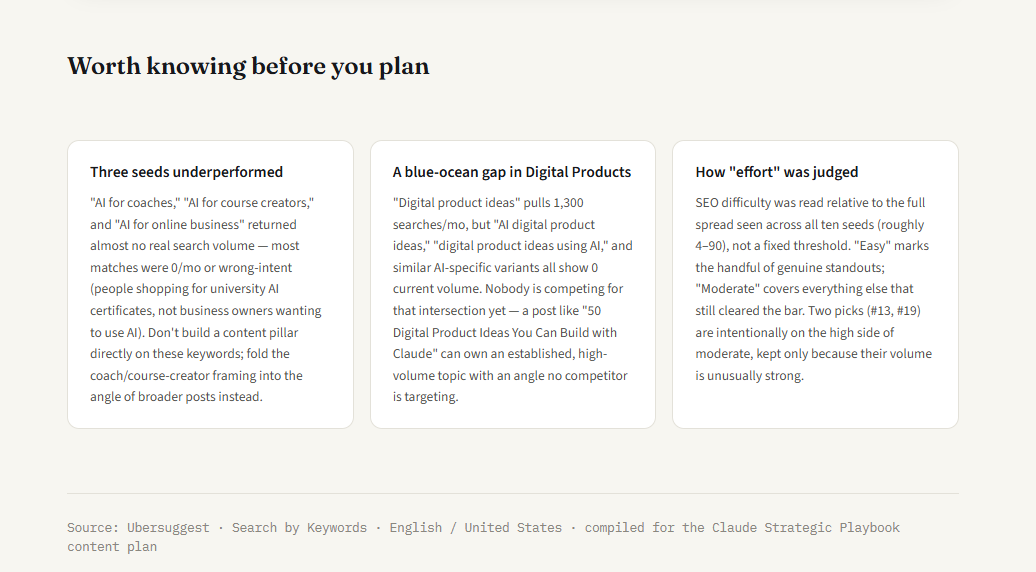
What came back was the Keyword Opportunity Map, 28 keywords ranked by volume against difficulty and grouped into seven themes. It also flagged three of my seed terms as nearly empty. Most of their matches had zero volume or were people shopping for university certificate programs. And it found a gap I would have missed: "digital product ideas" gets 1,300 searches a month, while every AI-specific version of it shows zero, so nobody is writing that angle yet.
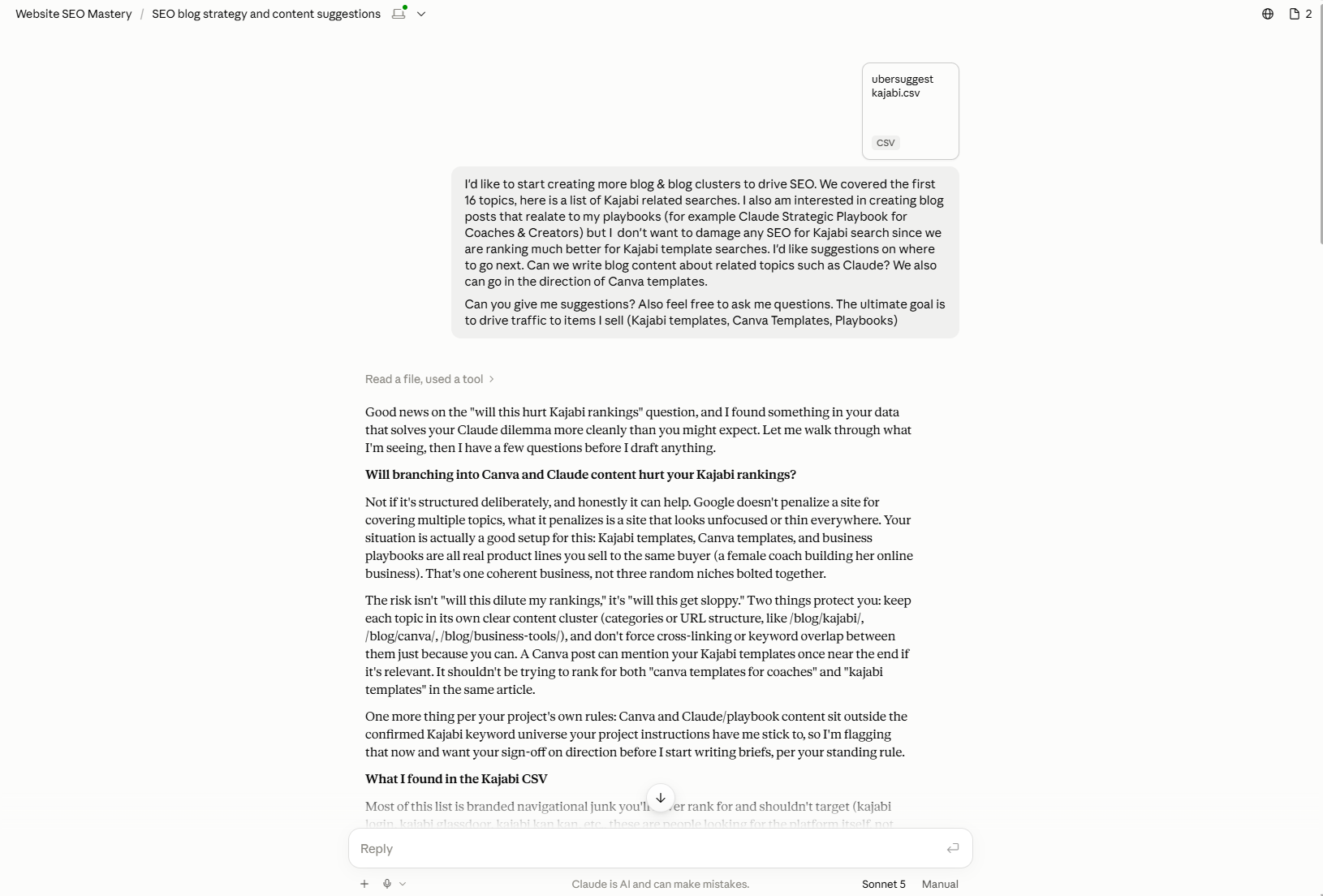
Reviewing the keyword data in chatThe Keyword Opportunity Map
Turning keywords into a plan
In the same chat, I asked one follow-up.
Follow-up · article cluster
Can you give me 10 articles and descriptions that you would recommend me creating, either blog or Medium articles?
That gave me a ten-article cluster, each one tied to specific keywords from the map.
How to Use Claude AI: The Complete Beginner's Guide
50+ Digital Product Ideas You Can Build with Claude AI
What Is Business Strategy? (And How AI Changes the Game)
AI for Entrepreneurs Who'd Rather Think Than Prompt
How AI Actually Boosts Business Productivity (Not Just Busywork)
AI Content Strategy: Planning Like a Strategist, Not a Prompt Engineer
Claude vs. ChatGPT: Which One Should You Actually Use?
The Claude AI User Guide Every Coach and Consultant Needs
What Is AI Coaching? A Strategic Look at AI for Coaches
Will AI Replace Entrepreneurs? Here's What It Actually Replaces
Then I asked what the first one should cover.
Follow-up · article outline
What would you say should be covered in this article: [paste the article title and description]
The answer was a seven-section outline, including which keywords belonged in the H1 and the H2s and which two sections should carry the most words.
Handing it to the writing workspace
Research and writing live in different places for me. I took that outline into my blog writing Project, which already holds my keyword rules, my blog structure and my voice Skill, and opened with this.
Writing Project · opener
I need to create a cluster around [topic] (to sell [product]). This is the first article. It should preface that [the personal context the opening needs].
Here is the title and outline, ask me any questions that you need and also use /[your voice skill]

[paste the outline]
Claude asked four questions before writing anything: the exact product name and link for the call to action, whether I wanted a brief first or a draft, how to handle links to cluster posts that didn't exist yet, and where to find the specifics for the opening. Then it produced an SEO brief with the slug, meta title and description, H2 structure with word counts, and an internal link table. It also flagged three things for me to decide, including a warning not to state a free-plan message limit, since that number isn't published and changes.
I answered, added the real ways I use Claude in my business for one section and the Chapter 5 prompt formula for another, and approved the brief. The draft that came back went through a banned-phrase check and was published on my blog as the first article in the cluster.
That's the full path from one research run: ten seed terms, 28 keywords, ten planned articles, and one published cornerstone post that every other article in the cluster links back to.
What the map flagged before planning
Try it yourself
Log into the keyword tool you use, run the brief with eight to ten seed terms, and ask for the ten-article follow-up. Take the first article through the outline prompt before the end of the week.
Why This Matters
The research that shapes a business rarely gets done because it's slow, and slow work loses to urgent work every day of the week. So offers get priced by gut, listings get titled by instinct, and sales pages get written in the seller's words instead of the buyer's.
Claude in Chrome changes the cost of the work. Twenty listings, three competitors, seven hundred reviews and ten keyword seeds took me four prompts and almost none of my attention. Research that used to happen once a year, if at all, can now happen before every launch.
The brief is the actual skill. Anyone can ask Claude to "look at my competitors." The version that comes back with sourced findings, honest gaps and a clear "not shown" where the data ran out comes from a prompt that expects to run alone.
Every one of these reports also caught something I would have missed or gotten wrong. My own listings were skewing the search. A site was blocked, and Claude said so instead of guessing. None of the competitors sold the strategy that goes with the template. That kind of honesty is only as good as the guardrails you write into the brief, which is why they're in every prompt in this module.
Action Steps
Run the module, one brief at a time
Write your research brief template with Role, Task, Audience and Goal, plus the "not shown," stop and read-only guardrail lines, and save it where you can reuse it.
Run the Etsy teardown on one search term your buyers use, logged out or in a private window, and rewrite one listing title with a formula from the report.
Run the competitor teardown on the three sellers your buyers compare you to, keep the report private, and write one sentence on how your offer fills each opening.
Run the buyer language brief on your best-selling product and use three quotes, unchanged, in your next piece of copy.
Run keyword research in your logged-in keyword tool, ask for a ten-article cluster, and take the first article from outline to brief in your writing workspace.