
How Long Does It Really Take to Build a Kajabi Website?
Mar 16, 2026
One of the questions I get asked a lot by creators and coaches is surprisingly simple:
“How long does it actually take to build a Kajabi website?”
Most people assume the answer is measured in hours or days.
In reality, it depends entirely on how you start.
Some people open Kajabi and immediately begin building a site from a completely blank screen.
Others start with a structured template that already has the hierarchy, layout, and page sections mapped out.
Those two approaches lead to very different timelines.
And if you’ve ever logged into a new platform and stared at a dashboard wondering where to begin, you already know which one tends to stall progress.
Let me walk you through what typically happens.
Building a Kajabi Website From Scratch
Starting from scratch means you are responsible for every decision along the way.
You’re not just building a website.
You’re figuring out the structure of the website itself.
That includes questions like:
-
What pages should the site include?
-
What should the homepage communicate first?
-
How should visitors move through the site?
-
What sections belong on each page?
-
Where should offers, testimonials, and calls to action appear?
Then comes the design layer.
You begin experimenting with fonts, spacing, colors, imagery, and layout choices while trying to make everything feel cohesive.
Most people underestimate how long that phase takes because design decisions compound quickly. Every small change leads to another decision somewhere else on the page.
A typical creator building their first Kajabi website from scratch might spend several weeks getting the structure right before they even feel confident publishing it.
Not because Kajabi is difficult.
Because a blank page requires hundreds of decisions.
Why Structure Is the Real Time Saver
The biggest challenge isn’t learning Kajabi.
It’s figuring out the hierarchy of the site.
Every strong website has a simple structure behind it:
Homepage
About Page
Offer or Services Page
Sales Pages
Lead Magnet Pages
Contact or Inquiry Page
Once that hierarchy exists, the rest of the process becomes far easier because each page has a clear role in the ecosystem.
Without that structure, creators often jump between pages, experimenting and rearranging sections without a clear direction.
Progress slows down because the foundation isn’t defined yet.
Where Templates Change Everything
This is where a well-built Kajabi website template saves an incredible amount of time.
A good template does something subtle but powerful.
It removes the need to invent the structure.
Instead of opening Kajabi and wondering where to begin, you open a template and see an entire website framework already mapped out.
Pages already exist.
Sections are already organized.
The hierarchy is already logical.
Now the work becomes much simpler.
You’re not building the architecture anymore.
You’re simply customizing the environment to reflect your brand and message.
The Role of Placeholder Content
One of the most underrated features of a well-designed template is placeholder text.
When you open a strong Kajabi template, you don’t just see empty sections.
You see examples of what belongs there.
A headline area already shows the type of messaging expected in that space.
A testimonial section already shows how social proof is displayed.
An offer section already illustrates how your services or products should be positioned.
Instead of wondering what to write, you can simply replace the placeholder content with your own story, expertise, and offers.
That one change alone can save hours of hesitation.
You’re never staring at a blank page trying to invent everything from scratch.
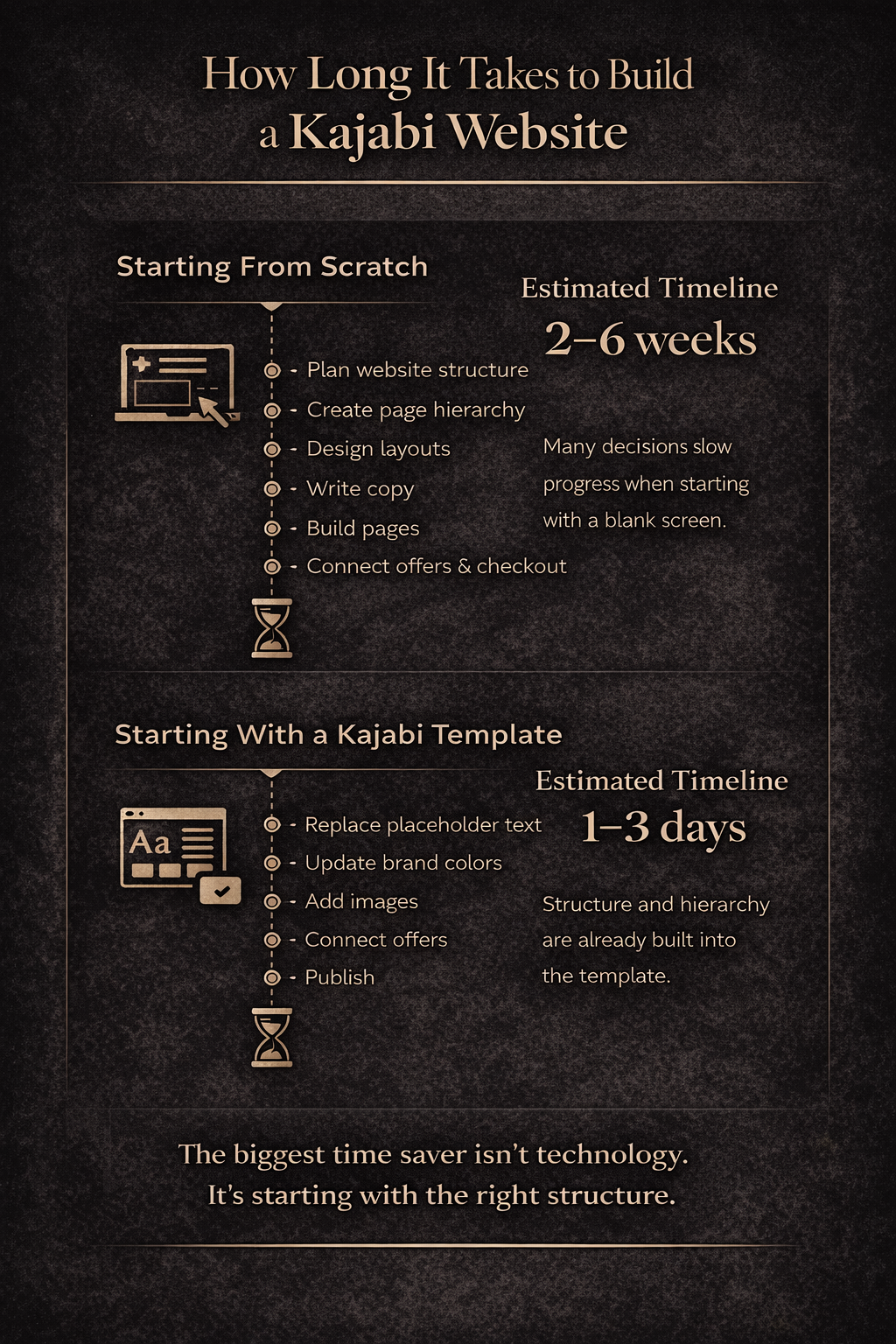
A Realistic Timeline
When creators build a Kajabi site without a template, the timeline often stretches into multiple weeks or even months.
Not because the work itself takes that long, but because progress slows every time a new structural decision appears.
With a template, the process is dramatically different.
Most creators can have the core of their site ready in a few focused sessions.
That includes:
-
Replacing the brand colors and typography
-
Updating images
-
Personalizing the copy
-
Connecting offers and products
The underlying architecture already exists, so momentum builds quickly.
And momentum matters.
When the structure is already solved, people move from planning to publishing much faster.
Why This Matters More Than People Realize
Many creators delay launching their website because they feel the process will be overwhelming.
In reality, the biggest barrier is simply starting with a blank canvas.
Once the structure exists and the hierarchy is clear, Kajabi becomes an incredibly smooth platform to work in.
Pages connect easily.
Offers can be linked to checkouts.
Lead magnets plug directly into email sequences.
Everything begins to feel like a cohesive system instead of a collection of disconnected pages.
My Personal Take
I’ve been building businesses online for years, and I’ve used Kajabi extensively for courses, coaching, digital products, and marketing systems.
One thing I’ve learned is that the speed of building a website rarely comes down to technical skill.
It comes down to clarity and structure.
When those pieces are solved ahead of time, everything else moves faster.
That’s exactly why I started building Kajabi templates.
Not because Kajabi needs help technically.
But because creators deserve a starting point that already feels organized, professional, and ready to personalize.
When the framework exists, the website stops feeling like a project that takes months.
It becomes something you can actually finish.
And launching something real always beats waiting for something perfect.
In my next article, I'll share everything you need to know about Kajabi for coaches.
Simon
Pro tip: Whether you are using a Kajabi template or building from scratch, one thing you'll want to do is make sure your website has the right SEO structure so that you can capture search engine traffic.
This is one area that most creators skip and its a massive missed opportunity. Grab my Kajabi SEO playbook if you'd like to know how to optimize your Kajabi website for Google search traffic.
Grab my free High Ticket Coach Branding Guide
A free guide for coaches, consultants, and creators who are ready to ditch the DIY look and step into a cohesive, premium brand presence that sells.
We hate SPAM. We will never sell your information, for any reason.